


Frequently Asked Questions
What are Skimmer’s three recurring tools and when do I use each?
Skimmer offers: recurring work order schedules (use for fixed-date jobs that deserve their own work order), work order reminders (use when a task needs action but not a specific date), and recurring checklist items (use for quick tasks done during regular service that don’t need separate billing).
How do recurring work order schedules function and what is the “unscheduled bin”?
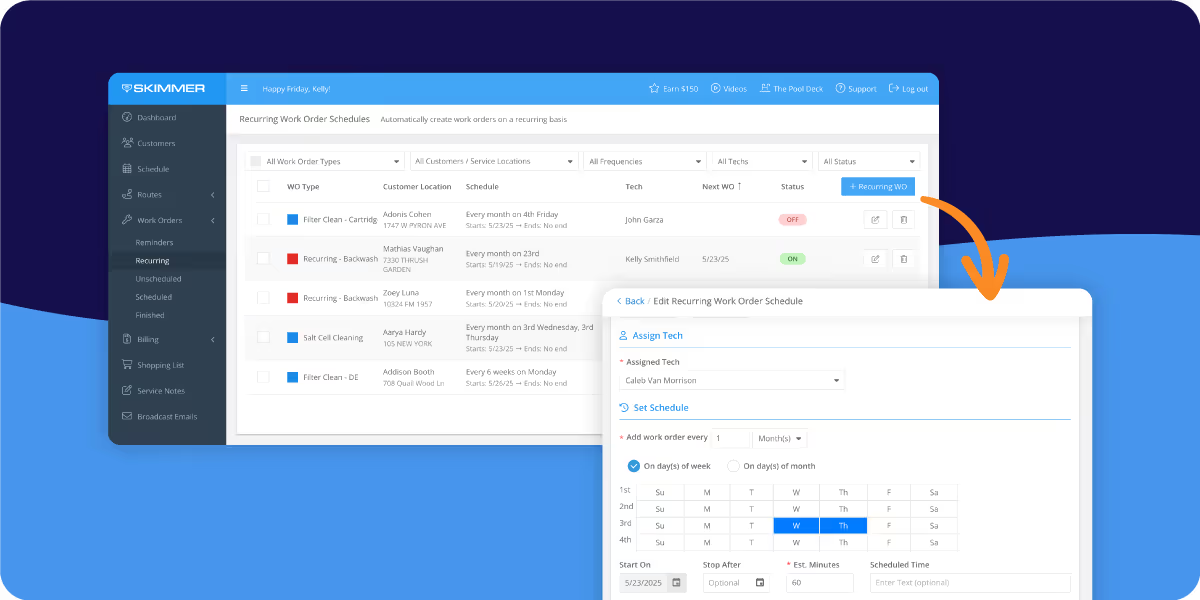
Recurring work order schedules auto-create dedicated work orders on a fixed cadence (e.g., every third Thursday). You can assign a tech or leave it unassigned—in which case the work order appears in the schedule page’s “unscheduled bin” for week-to-week planning and manual assignment.
How do work order reminders prevent missed maintenance?
Work order reminders trigger based on the last completed date and prompt you to create a work order when it’s due. They give flexibility for tasks that don’t require a specific day while reducing missed jobs and paperwork errors.
When should I use recurring checklist items instead of a separate work order?
Use recurring checklist items for simple, routine tasks completed during a regular service visit (no separate billing). Use a separate recurring work order when a task needs its own visit, billing line, or a dedicated tech assignment.
How do these recurring tools help with billing, routes, and customer satisfaction?
Automation creates predictable schedules and completion records, improving invoicing accuracy and route planning. That reduces manual admin, prevents missed services, and addresses issues noted in Skimmer’s Pool Owner Report—consistent service quality—building trust and scalable growth.
Key Takeaways:
- Scaling past ~100 pools isn’t about finding more leads—it’s about tightening internal processes. Automating scheduling and admin cuts errors and frees you to service more accounts reliably.
- Skimmer’s three recurring tools solve different needs: Recurring work order schedules for fixed-date jobs (most hands-off), Work order reminders for flexible timing based on last completion, and Recurring checklist items for simple in-visit tasks that don’t need separate work orders.
- Built-in scheduling gives clear visibility—who’s doing what and when—reducing missed tasks, improving service consistency, and making billing more accurate so you get paid on time.
- Bottom line: automation through these tools is a real competitive advantage—less desk time, happier customers, and a smoother path to growth.
##Key takeaways##
The ability to streamline operations, manage schedules effectively, and reduce manual admin work can be the difference between spinning your wheels and seeing real, sustainable business growth.
Pool service businesses, especially those managing multiple properties or servicing large client bases, face a unique set of challenges. Routes need to be optimized, maintenance tasks need to be tracked, and every visit needs to be billed accurately. Doing all this manually isn’t just time-consuming; it’s prone to errors that can cost money and harm customer trust.
That’s where scheduling and automation come into play.
With the right tools in place, pool pros can set recurring schedules, streamline back-office tasks, and ensure that no job slips through the cracks. This kind of automation isn’t just about saving time—it’s about empowering businesses to grow confidently, knowing that their operations are running smoothly and consistently.
Skimmer's suite of recurring tools
Skimmer’s suite of recurring tools, which includes three powerful features, is designed to tackle these pain points.
1. Recurring work order schedules: Best for work on a predictable schedule
Recurring work order schedules work best when a work order needs to happen on a predictable, fixed schedule—like every third Thursday or the second day of each month—and deserves its own dedicated work order. You can assign a specific tech or leave it unassigned, giving you flexibility in scheduling. Unassigned work orders appear in the "unscheduled bin" on the schedule page, so teams can plan week to week while still benefiting from automated scheduling. This is the most hands-off way to stay on top of recurring work orders.
2. Work order reminders: Best for work that doesn’t need to happen on a specific day
Work order reminders are ideal for recurring work that doesn't need to land on a specific day. Instead of automatically creating the work order, Skimmer reminds you when it's time to make one, based on when the job was last completed. This gives you more flexibility while still keeping recurring work from slipping through the cracks.
3. Recurring checklist items: Best for recurring work that happens during regular service
Recurring checklist items are perfect for simple recurring work that happens during regular service visits and don't need their own work order. These items show up automatically on the service checklist when they're due—no separate scheduling required. They're great for quick work that isn't billed separately but still needs to be tracked and completed consistently.
Better scheduling for happier customers
The average pool service business handles dozens, if not hundreds of properties per week, so keeping track of what needs to be done and when can be a logistical challenge. When manual scheduling is the primary method, human error is inevitable—whether it’s missing a filter clean, overlooking a chemical adjustment, or forgetting to send an invoice.
This isn’t just a problem for your team. In Skimmer’s recent Pool Owner Report, we found that inconsistent service quality is the top frustration among pool owners.

Using scheduling tools like those found in Skimmer solves these problems by creating a predictable, reliable framework for managing work. Recurring work order schedules, for instance, allow you to set tasks and let the system handle the rest. The result? Less time spent behind a desk and more time building relationships with clients and growing your business.
Additionally, automation through Skimmer improves clarity and control. When everything is scheduled digitally, you know exactly what’s coming up, who’s handling it, and when it’s due. This level of visibility reduces confusion among team members and ensures that clients receive the high-quality service they expect.
How Skimmer’s recurring tools can help you drive business growth
With Skimmer’s full suite of recurring tools, pool pros are better equipped to scale. Custom checklists keep regular tasks consistent, work order reminders prevent missed maintenance, and now recurring work order schedules streamline ongoing services. This three-part system creates a workflow that not only boosts efficiency but also improves service quality.
Moreover, reliable scheduling means reliable billing. When tasks are automated and completed on schedule, invoicing is consistent and accurate—no more chasing down payments for forgotten work or overlooked services. This kind of reliability builds trust with customers and strengthens business relationships.
The bottom line
Automation and scheduling aren’t just conveniences—they’re competitive advantages. For pool service pros looking to grow their business, cut down on manual admin work, and deliver exceptional service, Skimmer’s suite of recurring tools provides a clear path forward. With custom checklists, work order reminders, and the new recurring work order schedules, you can take control of your schedule, reduce errors, and grow your business with confidence.
If you’re ready to see how automation can improve your business's scheduling, it’s time to take a closer look at Skimmer.


