


Frequently Asked Questions
What is Skimmer’s new scheduling feature?
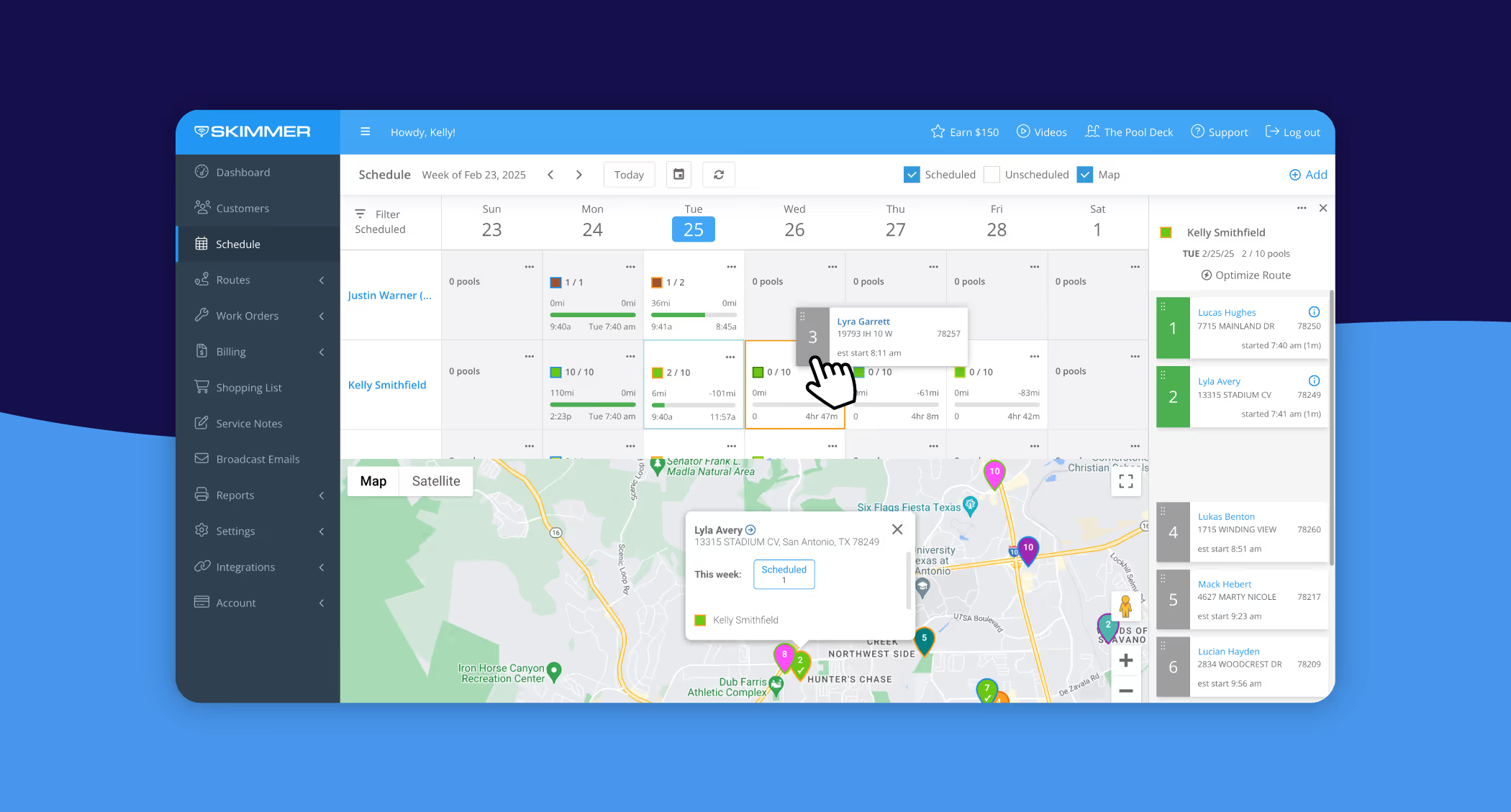
Skimmer’s schedule combines a Calendar view, an Unscheduled bin, and a Map view to manage multi-day workloads, visualize routes, and assign work orders. It’s built for admins to balance technicians’ schedules, reduce drive time, and streamline route planning across your team.
How is the schedule different from the route dashboard?
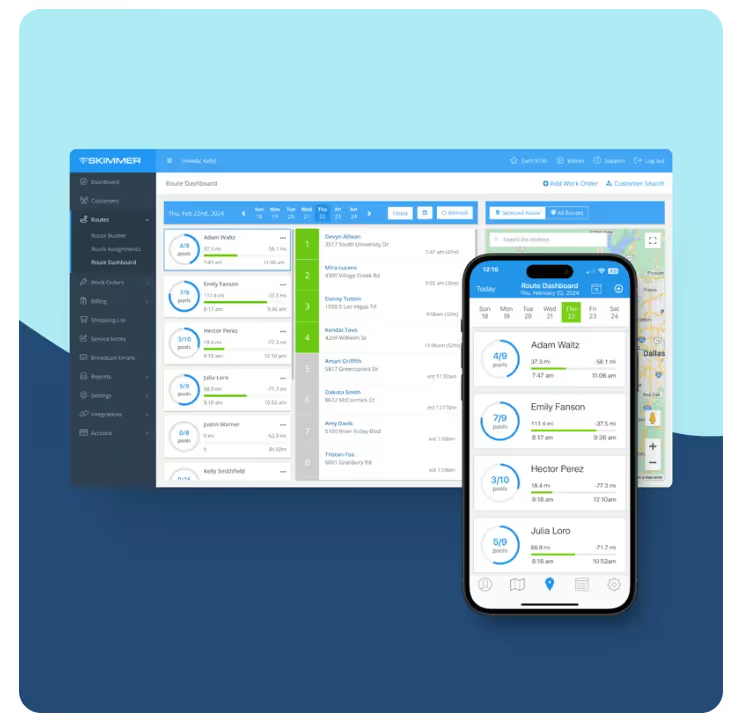
The route dashboard optimizes same-day routes and quick adjustments. The schedule is for multi-day planning—giving admins a weekly calendar, workload visibility across technicians, and map-based route planning to allocate resources and prevent overload.
Which Skimmer plans include the scheduling feature?
Scheduling is available on the Scaling Up and Owning the Market tiers. To add it, contact Skimmer sales or your account rep to upgrade, or reach out to support to enable scheduling on your account.
How does the Unscheduled bin and drag‑and‑drop work?
The Unscheduled bin holds new work orders and unassigned customers. Drag a job from the bin onto a technician’s day in the Calendar or directly onto the Map to assign it—instantly updating the route and workload for that tech.
What real benefits will scheduling deliver for my pool business?
Expect higher productivity, less wasted drive time, better technician workload balance, reduced overtime, faster response times, and improved customer satisfaction—helping you scale operations more efficiently and protect your margins.
Key takeaways:
- Bad scheduling (whiteboards, spreadsheets, paper) wastes time, fuel, and can lead to missed appointments and burned-out techs—good scheduling isn’t optional if you want to grow.
- Skimmer’s new schedule (available on Scaling Up and Owning the Market tiers) brings Calendar, an Unscheduled bin with drag‑and‑drop, and a Map view into one place so you can assign jobs and plan routes faster.
- Use the route dashboard for same‑day, on-the-fly route optimization; use the schedule view to manage workloads across multiple days and balance your team’s hours.
- Result: less drive time and downtime, better-balanced tech workloads, faster response to customers, and a simpler path to scaling your business.
##Key takeaways##
Running a pool service business is no small feat. Between managing routes, keeping track of work orders, and ensuring your team is operating efficiently, scheduling can quickly become a challenge. Many pool pros rely on outdated methods like whiteboards, spreadsheets, or even paper schedules, which can lead to errors, missed appointments, and inefficient routes, and this just gets more complex as you grow.
Last-minute cancellations, emergency service requests, and unpredictable weather conditions can further complicate the scheduling process. Without a reliable system, techs might find themselves driving long distances between jobs, leading to wasted time and increased fuel costs. Additionally, an unorganized schedule makes it difficult to balance workloads across the team, potentially causing technician burnout or customer dissatisfaction due to service delays.
In short, a disorganized schedule leads to wasted time, higher costs, and unhappy customers. That’s why having the right scheduling tools isn’t just a nice-to-have—it’s essential for growing your business and keeping your operations running smoothly.
At Skimmer, we know that pool pros need a simple yet powerful way to manage their schedules, routes, and workloads. That’s why we’re excited to introduce our brand-new scheduling feature, designed to help you streamline operations, optimize your team’s time, and deliver top-notch service to your customers.
A smarter, more efficient way to schedule
Our new schedule feature is available to customers on the Scaling Up and Owning the Market tiers and brings three key workforce management tools together into one easy-to-use view:
- Calendar view: Get a clear daily or weekly overview of workloads across all your technicians. See who’s scheduled for what, spot gaps in coverage, and make adjustments on the fly.
- Unscheduled bin: Keep track of new and upcoming work orders, as well as customers who haven’t been assigned a route yet. With simple drag-and-drop functionality, scheduling new jobs has never been easier.
- Map view: Visualize your scheduled and unscheduled work on a map for efficient route planning. Reduce unnecessary drive time and make sure your techs are covering the most efficient routes possible.
Watch the video below for a great primer on this new feature and how it can help you 👇
Route dashboard vs scheduling in Skimmer
Skimmer already offers several route management features designed to make building schedules and managing techs super simple. Our route dashboard has been around for a while and is one of our most popular features. It’s perfect for same-day route planning because it’s all about optimizing routes for efficiency and making quick adjustments on the fly. But for admins managing workloads across multiple days and techs, the schedule feature is a game-changer.
Why this matters for your business
A well-organized schedule is more than just a logistical win—it’s a game-changer for your bottom line.
- Increase efficiency & productivity: Streamline scheduling to reduce downtime and increase the number of jobs your team can complete each day.
- Optimize your workforce: By viewing workloads over a full week, you can allocate resources more effectively, minimize overtime, and get the most out of your technicians.
- Improve customer service: Faster response times and fewer scheduling conflicts mean happier customers and stronger relationships.
- Scale your business faster: Whether you’re growing your team or expanding into new service areas, our scheduling tool helps you stay organized and maintain operational efficiency.
Take control of your scheduling today
With Skimmer’s new scheduling feature, managing your team’s time has never been easier. Stay organized, reduce inefficiencies, and keep your customers happy—all in one simple, powerful tool.
.avif)


