


FAQs
What does “connected systems” actually mean for a pool service business?
It means the tools you use to run the business — scheduling, routes, service records, work orders, billing — share one set of information instead of each holding its own copy. When a tech logs a service in the field, the office bills from that exact record; when a repair gets noted on-site, it’s already attached to the right customer and ready to quote. Nothing gets re-entered, because there’s only one version of the truth. The opposite is a “disconnected” setup, where a calendar app, a spreadsheet, a billing tool, and a group text each hold part of the picture and a human has to carry information between them.
Isn’t adding software the same as adding complexity?
It feels that way, which is why a lot of owners avoid it. But connecting your systems is subtraction, not addition — the goal is fewer seams, not more tools. A disconnected setup with five apps that don’t talk to each other is more complex to run than one platform where the information moves on its own. The complexity you feel day to day usually lives in the gaps between tools, not in the tools themselves.
How do I know if disconnection is actually costing me money?
The cost rarely shows up as a single bill, which is why it goes unnoticed. It shows up as admin hours, slow billing, repair revenue that never gets invoiced, and an owner who can’t step away. A quick gut check: if the same information gets typed in more than one place, if getting an invoice out waits on a detail someone has to track down, or if the office usually hears about field problems from the customer instead of the tech, disconnection is taxing your business.
My current setup works. Why change it?
A disconnected setup works fine when one person — usually the owner — can hold the whole picture in their head. The trouble starts with growth. Add routes, techs, and customers, and no single person can track it all anymore. The informal glue (memory, group texts, end-of-day catch-ups) stops carrying the load, and things fall between the people who each assumed someone else had them. The setup didn’t get worse; the business got too big to run the way it always has.
Will I have to replace everything at once?
Not necessarily. The point isn’t to rip and replace for its own sake — it’s to reduce the number of places your information has to be manually carried from one spot to another. The practical move is to look at where the same data is being re-entered or chased, and close those gaps first.
Where does an all-in-one platform fit in?
An all-in-one platform built for pool service is designed around a single source of truth, so the field, the office, and the customer all draw from the same record. That’s the mechanism that makes the copying, reconciling, and chasing disappear. Skimmer is one of these platforms, but the principle matters more than the brand: the fewer seams your information has to cross, the less invisible overhead your business carries.
Key takeaways
- The friction that creeps in as a pool business grows — re-entering the same service data, hunting for the details you need to bill a repair, waiting to hear what happened on a route — is rarely a people problem. It’s a systems problem.
- Disconnected tools create invisible overhead: small handoffs that feel trivial on any given day quietly compound as your stop count climbs.
- That overhead doesn’t show up on an invoice. It shows up as admin hours, slow billing, missed repair revenue, and an owner who can’t step away.
- Adding another point tool usually deepens the problem. Connecting what you already have is what removes the drag.
- The industry is consolidating for exactly this reason, and it’s worth understanding why before you buy your next piece of software.
##TOC##
##Key takeaways##
There’s a moment a lot of pool service owners reach without quite naming it. The business is doing well, demand is steady, you’ve added routes and maybe a tech or two, and yet the work of running it feels harder than it did when you were smaller. More accounts, more revenue, more headaches per dollar. The instinct is to assume you’ve outgrown your process and need to add something: a scheduling app, a CRM, a tool to chase invoices, a person to keep it all straight.
Before you do, it’s worth questioning the premise. The thing holding most growing pool businesses back isn’t a missing capability. It’s that the capabilities they already have don’t talk to each other, and no new tool fixes that. It usually makes it worse.
The friction is a systems problem, not a people problem
When things slip, the natural place to look is people. The office should stay on top of billing. The techs should communicate better. Maybe you need to hire someone to own the chaos. Sometimes that’s fair. But a surprising amount of what gets blamed on people is really the system making people do work it shouldn’t.
Picture an ordinary week. A tech finishes a stop and logs it in one place; someone in the office later re-enters a version of it to get an invoice out. A tech spots a cracked actuator or a pump on its last legs, means to flag it, and the detail ends up in a text thread or on a clipboard, so it gets chased down days later, if at all. A customer calls asking why their pool looked off last week, and answering means piecing the story together from three different places. The office doesn’t know a route ran long until the customer calls wondering where the tech is.
None of that is a motivation failure. Your team isn’t refusing to try. They’re spending real energy bridging gaps between tools that were never designed to connect. Every time a human has to carry information from one place to another, that handoff becomes a spot where time leaks and mistakes slip in. The harder everyone works, the more of that invisible work they’re actually doing.
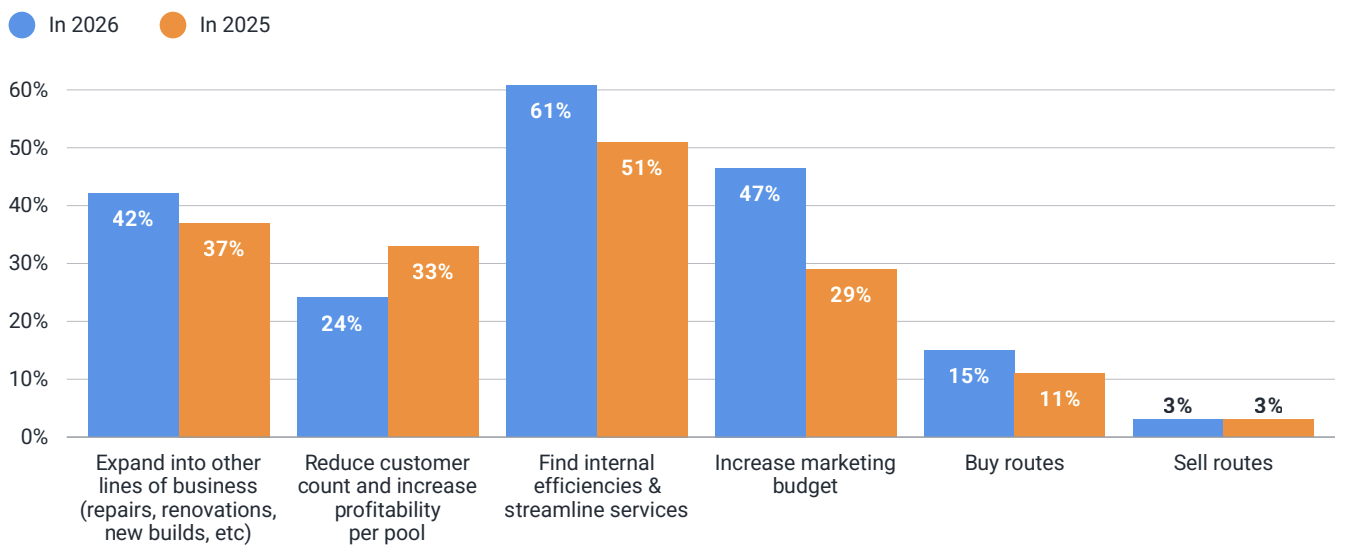
It’s telling that when pool pros are asked how they’ll grow in 2026, the single most common answer isn’t “add customers” or “raise prices” — it’s finding internal efficiencies and streamlining how the business runs. In the 2026 State of Pool Service Report, 61% named it their top strategy, ahead of every other move.
The overhead is invisible, which is why it survives
The reason this goes unaddressed for years is that it never sends you a bill. There’s no line item for “twelve minutes re-keying a service record” or “a payment that came in three weeks late because the billing detail lived in the wrong place” or “a $1,400 repair that never got invoiced because nobody told the office.” Each instance is small. That’s precisely why it persists.
But small doesn’t mean cheap, because the cost scales with the business. A handful of manual handoffs is an afternoon’s annoyance. A few hundred stops’ worth is a full-time role you created by accident. The overhead compounds in a way that’s easy to feel and hard to see: more volume means more handoffs, more handoffs mean more places to drop something, and more dropped balls mean more time spent reconstructing what went wrong instead of moving forward. This is the trap of patching growth with point tools. Each one solves its narrow job, but the seams between them — the copying, the reconciling, the chasing — become the real drag. Eventually you’re managing your tools instead of your business.
It’s the same hidden tax knowledge workers pay everywhere. The Harvard Business Review found people toggle between apps nearly 1,200 times a day and lose close to four hours a week, about 9% of their time, just reorienting after each switch.
Why it gets worse exactly when you’re growing
A small operation can absorb a disconnected setup, because one person — usually the owner — holds the whole picture in their head. You know which accounts are difficult, what a tech mentioned yesterday, which invoice is still open. The system is informal, but it works because the surface area is small enough for memory to cover.
Growth breaks that quietly. Add routes, techs, and customers and no single person can hold the picture anymore. The informal glue — memory, group texts, end-of-day catch-ups — can’t carry the load, and things start falling between the people who assumed someone else had them. That’s the ceiling owners describe but struggle to diagnose: not a shortage of demand, but a business that’s become too big to run the way it always has.
The wider industry has landed on the same conclusion. According to Skimmer’s 2026 State of Pool Service Report, software has moved from a side project to core infrastructure, and the shift toward consolidation is striking: roughly two-thirds of companies shopping for software now want a single all-in-one platform rather than a patchwork of separate apps. The report is direct about the cost of the alternative, pointing out that operators still juggling a mix of calendars, spreadsheets, and standalone apps are paying for it in admin time, communication delays, and technician confusion. It names operational consistency as one of the traits now separating companies that scale smoothly from the ones that simply stay busy.
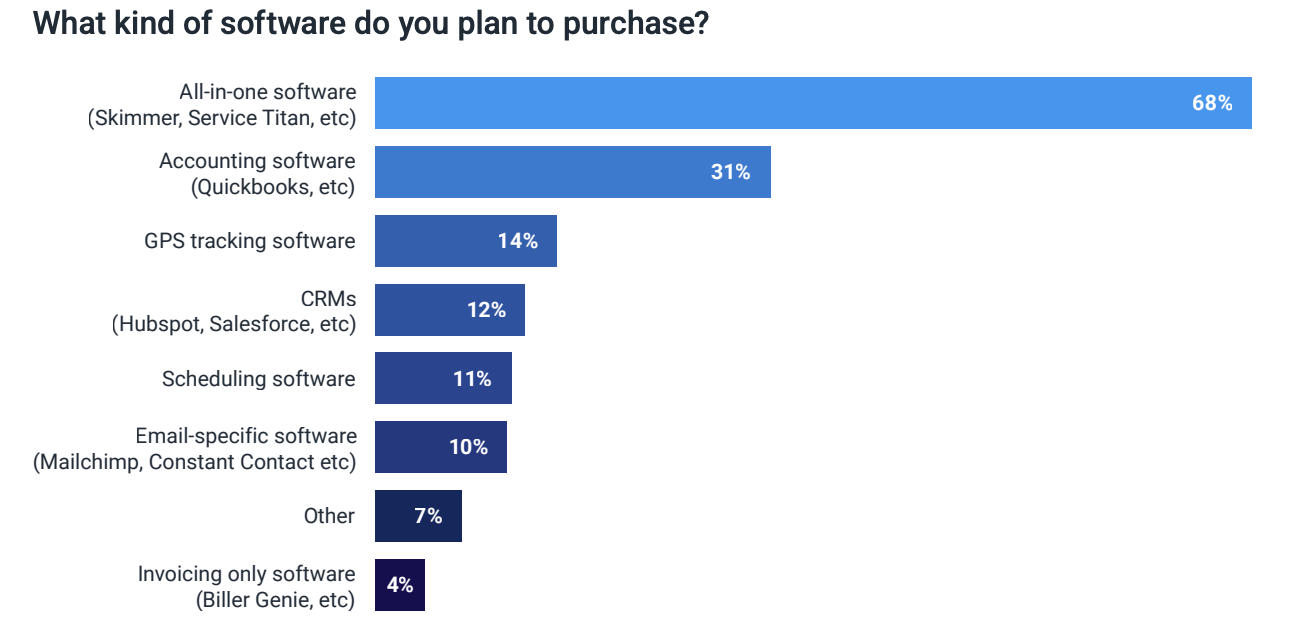
And this isn’t a one-year blip: in 2025, nearly 69% of software shoppers also wanted an all-in-one platform.
Connected systems remove complexity, they don’t add it
Here’s the part that feels backwards. When you’re already buried in tools, changing your setup sounds like more complexity — another thing to learn, migrate, and babysit. So owners stick with the setup they know and keep adding another tool whenever a new problem appears.
But connecting your systems is subtraction, not addition. The aim isn’t more software; it’s fewer seams. When the field, the office, and the customer all draw from one shared record, the copying disappears. A service logged on a route is the same record the office bills from. A repair noted on-site is already attached to the customer it belongs to and ready to quote. A question gets answered from one place instead of three. The owner can step away for two weeks and the business still knows what the owner knows, because the knowledge lives in the system, not in someone’s memory. This is the quiet logic behind why all-in-one platforms built for pool service — Skimmer among them — are designed around a single source of truth rather than a stack of bolt-ons.
That’s why the strongest operators usually don’t have the most tools. They have the fewest seams. Their information moves on its own, so the business runs on a system instead of on heroics.
Adding tools isn’t the problem — disconnected tools are
Everything so far might read as “never add software.” That’s not the point. Sometimes a specialized tool genuinely does something your core platform doesn’t, and adding it is the right call. The problem was never adding tools. It’s adding tools that don’t connect to anything.
Here’s the distinction that matters. A new tool that feeds your system of record, the one core platform where your customers, service history, and billing actually live, adds capability without adding a seam because the information still flows to one place automatically. A new tool that forces someone to copy data back and forth between it and everything else creates exactly the kind of handoff this whole article is about. Same new tool, opposite result.
So the rule isn’t “use the fewest tools possible.” It’s “keep one source of truth and make everything else talk to it.” Before you add anything, ask one question: does this connect to my system of record, or will it create another island of data someone has to bridge by hand? If it integrates and syncs automatically so nothing gets re-entered, it earns its place. If it can’t, the time you save with the feature will likely be lost to the copying it creates.
That’s the real version of “connected systems.” Not one app that does everything, but a core system that everything plugs into. Add what genuinely helps your business. Just make sure it talks to the record that runs it.
Warning signs your tools have stopped talking
A single instance doesn’t necessarily mean you have a systems problem. Every business has the occasional busy day or missed handoff. But when these situations happen repeatedly, they’re usually symptoms of disconnected tools rather than isolated mistakes. If several of the signs below feel familiar, it’s worth taking a closer look at how information moves through your business.
- The same service detail gets typed into more than one system before it becomes an invoice.
- Repairs spotted in the field get lost in text threads instead of turning into quoted work.
- Answering a routine customer question means opening three different tools.
- Billing regularly waits on someone to track down a detail before it can go out.
- The office finds out a route ran long when the customer calls, not before.
- You’ve added a new app for every new problem — and retired none of them.
What to do about it: your plan for the next 30 days
The real question for a growing pool business was never “what tool should I add next?” It’s “what’s disconnected, and what is that quietly costing me?” Tools hand you capabilities. Connected systems hand you a business that can grow without drowning in its own overhead — and that, more than any single feature, is what gets you past the ceiling.
Here's what to do in the next 30 days. You don’t have to replace everything at once. Start by finding the seams.
- Map where information gets re-entered. Follow one service from the field to the invoice. Count how many times the same detail gets typed, copied, or carried by hand.
- Find the chases. Note every time getting an invoice out, answering a customer, or billing a repair waits on someone tracking down information that already exists somewhere.
- Count your tools — and your seams. List the apps you run the business on. The problem usually isn’t any single tool; it’s the gaps between them.
- Prioritize the costliest gap first. The seam that leaks the most revenue or the most hours is the one to close first — usually the handoff between field work and billing.
- Choose for fewer seams, not more features. When you evaluate a platform, the question isn’t “what can it do?” It’s “how much of the carrying, copying, and chasing does it make disappear?”
Want to see how much manual overhead a connected setup removes from your operation? Explore how Skimmer keeps the field, the office, and billing on one shared record.


