


FAQs
Do I have to set up all my alerts before I can use this?
No. You can start with one. Most owners turn on a couple of alerts that matter most to them, like a skipped stop or a failed payment, and add more over time. The one piece that needs a quick setup is reading and dosage alerts, because Skimmer needs to know which readings you track and what thresholds matter to your business. That takes about five minutes, and after that it runs on its own.
Who can see the alerts panel?
Admins and owners get access automatically. If you want other roles on your team to see the panel, you can extend visibility under Settings > Roles & Permissions. Alerts live in a bell-icon panel in your top nav, so they're visible from anywhere in Skimmer without you having to navigate to a separate page.
Will everyone on my team get flooded with notifications?
Email notifications are entirely optional. Because new alerts are set to appear in the dashboard panel by default while remaining off for email, you can selectively opt in only for the specific alerts that truly require an inbox notification. You can also route specific alert types to specific people. Your billing person can get payment alert emails without seeing alerts about water chemistry, for example. The goal is the right alert to the right person, not every notification to everyone.
How is an "issue" different from a regular service note?
A service note is freeform text that's easy to bury and hard to track. An issue is structured. Your tech picks a defined type (Water Level Low, System Down, No Power, Bad Weather, Repair Needed), adds a description and up to five photos, and syncs. It lands in a dedicated issues tab on the service notes & issues page, where it's filterable by type, technician, customer, status, or date, and trackable from report all the way to resolution.
Can I keep a record of issues for reporting or insurance?
Yes. Every issue carries a full audit trail of who handled what and when, and you can export any filtered view to CSV. That's useful for internal reporting, insurance documentation, or customer communication. You can also configure a customer-facing email to notify pool owners automatically when a specific issue type is reported at their property.
Does this cost extra?
No. Office alerts and issues are available on all Skimmer plans at no additional cost.
Key takeaways
- Summer breaks the manual processes that worked in spring. More volume means more things to keep track of, and the workarounds that held up in April fall apart in July, exactly when you have the least amount of time to notice what’s slipping through the cracks.
- The most damaging problems are the ones you find out about late. Water chemistry issues that compound, techs running behind with no visibility, and field problems that never make it back to the office are the three issues that cause the biggest headaches during busy season.
- High-performing operations surface problems automatically. Instead of waiting to find out, they build systems that flag problems the moment they happen.
- Skimmer gives you full visibility into your operations with office alerts and issues reporting. Important issues surface automatically, so your team can respond faster instead of tracking down problems.
- The payoff is operational, not just informational. Fewer customer-driven surprises, faster resolution, and a team that knows what's happening without constant check-ins.
##TOC##
##Key takeaways##
Here's a scenario every pool pro knows. You're finishing your last stop of the day when your phone buzzes. It's a customer: "Hey, is everything okay with my pool? The water looks off."
You pull up the service notes. Nothing flagged. Everything looks normal. But three stops ago, a reading came in way out of range, and it just sat there in a note no one circled back to. Now you're finding out about it from the customer, which is the most expensive way to find out about anything.
That gap between something going wrong in the field and you finding out about it is manageable in April. By the time July hits, it could become really expensive.
Why manual processes break during busy season
Spring is forgiving. There are fewer stops to make, more daylight, and enough breathing room to catch problems manually. You can skim service notes at the end of the day, pull a report when something feels off, or ask a tech about any issues that may have occurred.
Then the busy summer season hits. Suddenly, you're running dozens more stops a day. Your techs are stretched. The pools that needed a little extra attention now need a lot. Busy seasons don't create more problems, they make the existing ones easier to overlook. And what ends up happening is that the one or two issues that need urgent attention get buried or missed in the day’s routine.
The processes that scaled fine at 30 stops a day quietly stop scaling at 80. You don't notice the moment they break. You notice three weeks later, when a customer calls, or when you finally sit down to reconcile and realize a pattern was forming the whole time.
The three things that go wrong most
When you talk to enough pool service owners, the same handful of problems come up again and again during the busy season. Three stand out sharply.
Chemistry issues that compound. A single out-of-range reading is usually fine. If the same pool shows low chlorine two or three visits in a row, you’re no longer looking at a one-off reading. You’re looking at a pattern that needs attention. The danger isn't the one bad reading, it's that no one's watching the pattern, and by the time it's obvious, it's a callback and an unhappy customer.
Techs running late with no visibility. A tech who hasn't started their route, or whose first stop is well behind schedule, sets off a chain reaction that lands on the last customers of the day, and on you when they call. In spring you'd probably notice. In summer, when you’re managing a dozen routes at once, a late start can go unnoticed until the customer calls.
Field problems that never make it back to the office. Your tech spots a piece of equipment that’s about to fail. They jot it in a service note, or they mean to mention it later and forget. The information exists somewhere, but it never reaches the person who’s supposed to act on it. So it doesn't get scheduled, doesn't get quoted, and doesn't get fixed until it becomes a bigger problem.
What these three issues have in common is timing. None of them is especially difficult to solve. The problem is that by the time you find out, they’ve already become bigger, more expensive problems.
What high-performing pool service businesses do differently
The owners who get through busy season without it feeling like a fire drill aren't working harder than everyone else. They've made a structural change: they've stopped relying on themselves to go looking for problems, and have built systems that bring the problems to them.
It's a subtle but important shift. The mindset shifts from, "I'll pull a report Monday morning and see what happened last week," to, "Tell me the moment something needs my attention, and let me ignore everything that doesn't." Instead of thinking, "I'll ask the tech if anything came up," you can now rest assured that "anything that comes up is already in my queue with a photo attached."
That's the difference between an operation that reacts to problems after the customer finds them and one that catches them first. And it's almost entirely a function of whether the right information surfaces automatically, or whether someone has to remember to go dig for it.
The common thread isn’t chemistry, scheduling, or repairs. It’s visibility. In every example, the issue already existed. The costly part was discovering it too late. That’s why the best-run pool businesses don’t solve that by checking reports more often or chasing down more updates. They build systems that surface the right information automatically, so the office can focus on being proactive about solving the right problems, instead of reactive.
How Skimmer helps
This is exactly what we built office alerts and issues to do. They're two new capabilities, now live on every Skimmer plan, that together give your office real-time visibility into what's happening in the field, without adding more admin work to your day.
Instead of asking the office to spend more time checking reports, following up with techs, or chasing down notes, office alerts and issues automatically bring important problems to your attention and turn field problems into structured, trackable work.
Office alerts watches your operation and notifies you automatically when something's off. Readings or dosages out of range, a tech who hasn't started, a skipped stop, an unfinished route, a failed payment, a quote approved or rejected, and more, across 25+ alert types spanning readings, stops, routes, payments, and work orders. Everything lands in a new bell-icon panel in your top nav, visible from anywhere in Skimmer, so there's no report to run and no separate page to navigate to. You can set urgency on any alert so the bell shows an orange dot when something needs immediate attention, and configure email delivery per alert type, routing the right alert to the right person rather than every notification to everyone.
Issues provides a structured alternative to freeform service notes for documenting problems in the field. When a tech spots something at a property, they pick a defined issue type, add a description and up to five photos, and sync, all from mobile, in about thirty seconds. It lands in a dedicated issues tab on the service notes & issues page, where your office can review it, add notes, track resolution, and close it out with a full audit trail of who handled what and when. You can filter by type, technician, customer, status, or date, and export any view to CSV for reporting or documentation.
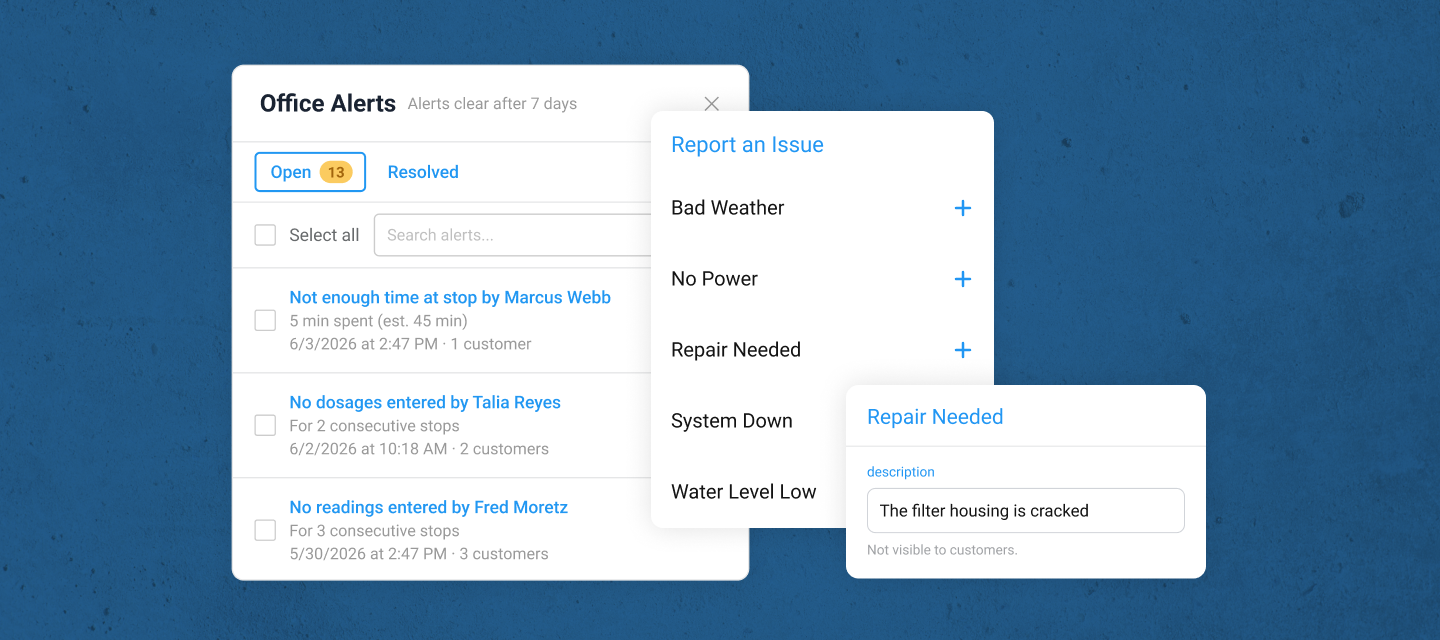
The point of both is the same: the office stays informed without anyone having to chase information down. The right information reaches you before you have to go looking for it.
The payoff
When problems surface automatically, the whole rhythm of busy season changes.
You get fewer of those customer calls that start with, "is everything okay with my pool," because you already knew, and already handled it. Resolution gets faster, because a structured issue with a photo attached is something your office can act on immediately, not a buried note someone has to interpret. And your team operates with less friction, because you're not interrupting techs for status updates and they're not wondering whether the thing they flagged actually got seen.
Ultimately, your team spends less time reacting to surprises and more time staying ahead of them. Instead of spending the busy months in a defensive crouch, reacting to whatever blows up next, you spend them running the business, with the confidence that if something urgent comes up, you’ll be alerted immediately whether it requires your attention or not.
Busy season is going to be busy no matter what. But it doesn't have to be the season where you find out about everything a week too late.


