


FAQ
Is AI going to replace pool techs?
No, and the data supports that. Research from Anthropic places field services, installation, and repair among the occupational categories least exposed to AI automation. The physical, variable nature of pool service work is difficult to replicate. What AI does well is reduce the administrative work surrounding that expertise — writing, documentation, analysis, communication — so techs and owners spend more time on the work only they can do.
What's the difference between free and paid AI tools?
Paid tiers — typically around $20/month for ChatGPT, Claude, or Gemini — produce better output, give you more control over how your data is used for training, and unlock features like extended context windows and project-based organization. Free versions are fine for casual exploration. For consistent business use, paid is worth it.
How do I get better results from AI?
Three things make the biggest difference: give it a specific prompt with enough context about your situation, provide relevant background material (pricing, SOPs, examples of past communications), and set explicit guidelines for length, tone, and what it should avoid. Think of it as briefing a capable but uninformed assistant — the more it knows about what you need, the less it has to guess.
Is my customer data safe if I use these tools?
It depends on what you share and which platform you use. Paid tiers of major AI platforms include controls that limit how your data is used for model training. For sensitive information — customer records, payment details, anything regulated — remove identifying details before uploading, or avoid including it altogether. When in doubt, don't share it.
What is vibe coding, and should I use it?
Vibe coding uses AI to build software tools without formal development experience. It works for simple internal tools with small user counts and for experiments you'd otherwise skip. It breaks down on anything involving customer data, payments, security, or reliability under pressure. Build small custom tools on top of a stable platform — don't vibe code the platform itself.
How does Skimmer's AI Phone work?
AI Phone answers inbound calls when you're unavailable. It's trained on pool service scenarios, handles realistic customer situations, and creates lead records in Skimmer automatically for new callers. Existing customers are recognized by phone number. You can set transfer rules so specific call types go to the right person on your team. Setup involves forwarding your existing number to the Skimmer-provided number — your actual number doesn't change. A 30-day free trial is available.
Key takeaways
- Sixty-three percent of pool pros are using or exploring AI, and 84% already use it personally — the gap is in business adoption, not familiarity with the technology.
- AI is reliable for text, patterns, and research; it needs human review on anything safety-critical, financial, or legally sensitive.
- Better AI output comes from three inputs: a specific prompt, relevant context (your SOPs, pricing, past examples), and explicit guidelines for length, tone, and what to avoid.
- Pool pros are using AI right now to accelerate tech training, simplify SOPs, write marketing content, build custom dashboards, and surface billing discrepancies — with real time savings.
- Paid tiers (~$20/month) produce meaningfully better output than free versions and include stronger privacy controls; they're worth the investment for business use.
- Vibe coding works for low-stakes internal tools; it's not appropriate for systems handling customer data, payments, or core operations.
- Skimmer's AI phone is available now with a 30-day free trial; AI insights is in beta; a field-facing tech assistant with offline capability is in development.
##TOC##
##Key takeaways##
AI is everywhere right now, and most of the conversation about it manages to be both overwhelming and vague at the same time. This guide cuts through that. Whether you've never opened ChatGPT or you're already using AI daily, the goal here is the same: give you a clear, practical picture of what AI can actually do for a pool service business, with real examples from pool pros who are already using it.
You can also watch our webinar on the same topic on demand here.
First, some context: where the pool industry actually stands on AI
Before getting into tactics, it helps to know you're not behind, and you're not alone in figuring this out.
According to a recent Skimmer survey, 63% of pool pros said they are using or actively exploring AI, already up from the figure captured in the 2026 State of Pool Service Report earlier this year. 84% said they use AI in their personal lives. That second number matters: for most pool pros, the hesitation around business adoption isn't about unfamiliarity with the tools, it's about knowing where they fit.
A live poll from Skimmer's webinar on AI gave a useful snapshot of where the industry sits:
- 16% are aware of AI but haven't tried it yet
- 38% are experimenting — have played with tools here and there
- 29% use AI as a regular assistant, multiple times a day
- 11% have AI embedded in workflows
- 7% are working with agentic AI (systems that take multi-step actions on their own)
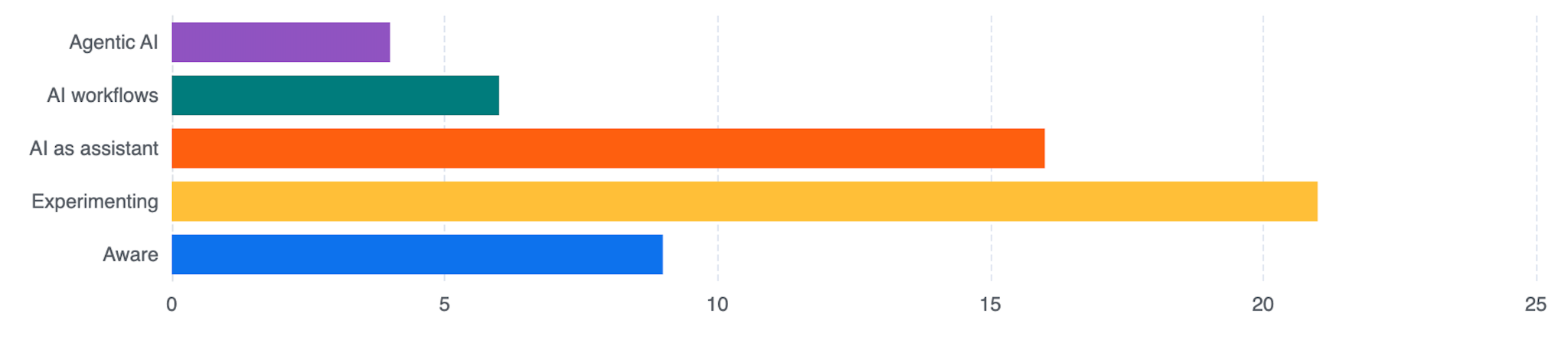
Most of the room fell somewhere between experimenting and regular use. If you're in that range, this guide will help you get more out of what you're already doing. If you're in the "haven't tried it yet" group, you'll have a clear path forward by the end.
One more data point worth holding onto: 75% of pool pros said they would pay more for AI tools built specifically for the pool industry rather than generic consumer tools. That preference reflects something real. Generic tools require significant setup to be useful for a specific business. Purpose-built tools come with context already loaded in.
What AI is good at and where it falls short
AI is genuinely strong at three things: text, patterns, and research. Writing emails, drafting content, summarizing documents, processing large sets of data to find trends — these are areas where it saves real hours for real businesses.
The limitation that matters most is that AI is a people-pleaser. It will attempt to answer any question, including questions where it doesn't have reliable information. It won't always tell you when it's wrong, and it can produce answers that sound authoritative but are simply false.
The practical rule of thumb is to treat AI as a first draft, not a final decision. It gets you 80% of the way there while you supply the judgment at the end.
There are also specific situations where human review is a non-negotiable:
- Anything involving electrical or chemical safety
- Serious customer complaints or disputes
- Legal or compliance questions
- Billing errors or financial decisions
AI can inform those conversations but it should not be the last word on any of them.
Field reality: A tech using AI to troubleshoot an unfamiliar heater can get useful initial direction — equipment specs, likely failure points, suggested next steps. That's genuinely helpful. The same tech still needs to verify the answer before touching the equipment. AI drafts; you decide.
The tools worth knowing
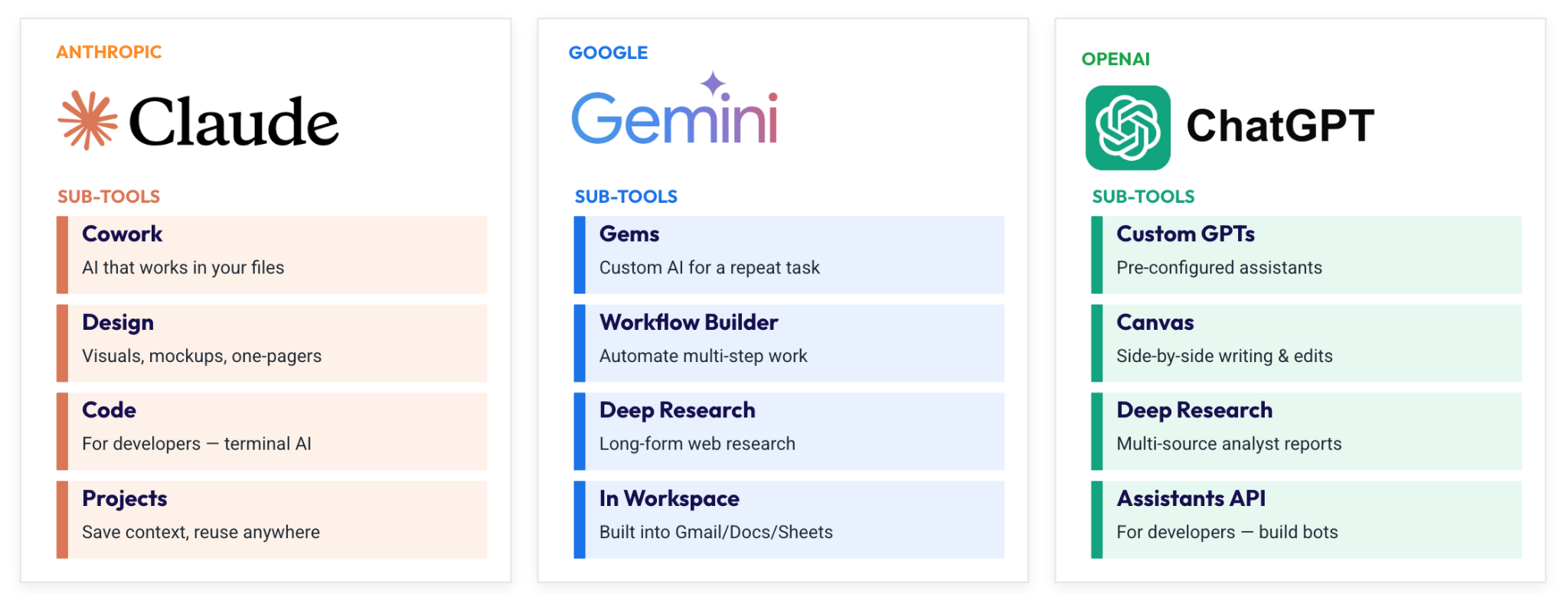
You don't need to use every AI tool on the market. Three platforms cover most of what a pool service business needs:
Claude (made by Anthropic) is strong for writing, document analysis, and working with business context. Its Projects feature lets you upload files (SOPs, pricing sheets, customer information, etc) that stay available across multiple conversations. You can share projects with team members, which makes it useful for anything involving consistent company knowledge.
ChatGPT (OpenAI) is the most widely recognized AI platform and continues to expand its capabilities. It's strong for ideation, content generation, and image creation. Niki Acosta uses it to process podcast transcripts into YouTube descriptions, social captions, and tags, something that used to take significant time and now takes minutes.
Gemini (Google) has a practical advantage if you're already using Google Workspace. It's built directly into Sheets, Docs, and Gmail, which means you can start using AI inside tools you're already in without any additional setup. For pool pros who live in Google's ecosystem, this is often the lowest-friction starting point.
A few notes that apply to all three: the paid tiers — typically around $20/month — produce meaningfully better output than free versions. They also give you more control over how your data is used. For personal experimentation, free is fine. For consistent business use, the paid version is worth it.
Not sure which one to try first? Ask each one to pitch you. Give each tool a test, tell it what you're trying to do, and ask why you should use it over the others. It's a useful exercise that also gives you a feel for how each tool communicates.
Beyond the big three, a few specialized tools came up consistently in conversations with pool pros:
- Notebook LM (Google) is useful for building a searchable knowledge base from documents you upload. Ben Nabors at Nabors Pool Services uses it to store and distribute training materials across his team.
- Canva now has AI-assisted design built in and is practical for creating social media content, flyers, and other marketing assets without hiring a designer.
- Perplexity is strong for research — it searches the web in real time and cites its sources, which makes it more reliable than standard AI tools for factual lookups.
Getting better results: the three inputs that actually matter
Most people who are frustrated with AI results are giving the tool too little to work with. Three inputs consistently separate useful output from output that misses the mark.
1. A specific prompt
A prompt is the instruction you give the AI. The more specific it is, the more useful the output.
Here's the same request written two ways:
Weak prompt: "Write me a follow-up email to a customer who missed their cleaning."
Strong prompt: "You're a pool service owner in Phoenix. Write a friendly but direct follow-up email to a residential customer who missed their weekly clean. Acknowledge the missed visit, offer to reschedule, and offer a small credit. Keep it under 120 words and professional in tone."
The second version gives the AI a role, a location, a situation, a task, a tone, and a length constraint. That's the difference between an email you might send and a generic template you'd rewrite from scratch.
2. Relevant context
Context is the background information you provide so the AI understands your specific business — not pool service in the abstract, but your operation. This can be:
- Your pricing sheet
- Your SOPs
- Past examples of emails you've sent that worked well
- A customer list or spreadsheet
- Equipment details and model numbers when troubleshooting
The more relevant context the AI has, the less it has to guess. If you're asking it to draft a price increase email, give it your current rates, your reasoning, and an example of a communication your customers responded well to. The output will be significantly better than if you ask it cold.
3. Clear guidelines
Guidelines define the rules for the output: length, tone, format, and things the AI should not do. Explicit guardrails reduce errors and keep the output in a range you can actually use.
A few examples of useful guidelines:
- "Keep it under 150 words"
- "Don't make anything up — if you're not sure, say so"
- "Use a friendly but professional tone, not sales-y"
- "Write in plain language — avoid jargon"
If you find yourself editing AI output heavily in the same ways every time, those edits belong in your guidelines up front.
What pool pros are actually doing with AI
The following use cases come directly from pool pros who participated in Skimmer's webinar and survey.
Accelerating field training
Zachary Treadway, Sink or Swim Pool Service has his techs use AI as a real-time thought partner in the field. When a tech encounters unfamiliar equipment, they describe the situation, upload a photo, and ask for guidance — including help locating documentation for equipment that's no longer on the market. In one case, a team came across an older Teledyne heater that had stumped everyone. By running a photo through an AI tool, they were able to locate documentation and get initial direction on how to handle it.
The more striking story: one of Zach's newer techs started keeping his headphones in and using AI's voice mode throughout his workday. Within two or three months, the questions he was asking — of the AI and of his colleagues — had advanced to the level of a much more experienced pool pro. He was engaging with problems more systematically and catching issues earlier, because he had a constant reference available.
Making training materials easier to use
Ben Nabors uses Notebook LM to manage training materials for his team. His team uploads SOPs and reference content to a shared knowledge base, which AI can then simplify, reformat, or restructure depending on who needs it. With this system, a complex decision tree for pump repair or replacement can easily become a more accessible reference document for someone new to the role.
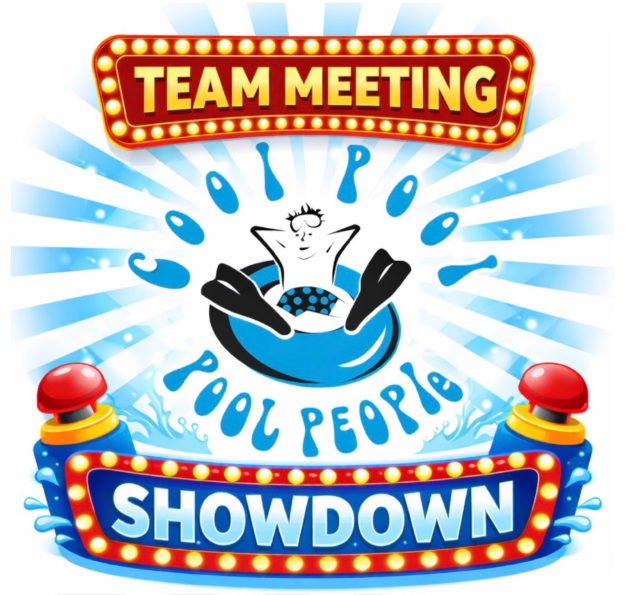
Chancy Green of Cool Pool People, another pool pro on the webinar, took this further. She uses AI to build gamified weekly team training sessions — a Family Feud or Price Is Right format — to make technical review more engaging. The AI generates the questions and builds the game. It's low effort and high engagement, and it keeps technical knowledge fresh without feeling like a compliance exercise.
Writing marketing content and customer communications
Robert and Jenn at Bearded PHool Services used AI to create an animated brand character that appears across their social media and in commercials. Before AI, that would have required hiring animators at significant cost. They built a consistent, recognizable visual identity at a fraction of the time and money.

For pool pros who aren't ready for that level of investment, the more immediate value is in writing. AI can quickly draft quarterly customer newsletters, service reminders, seasonal notices, and social posts. It writes responses to negative reviews without letting frustration drive the tone. Ben Nabors made the point that new pool companies can now close the marketing gap with more established ones much faster than was previously possible, because they no longer need a marketing agency to produce consistent content.
Building custom dashboards
Dean at Big Family Pools uses Claude Code to build custom dashboards and widgets on top of Skimmer's API. He has no formal coding background. He describes what he wants in natural language and works through the build conversationally.
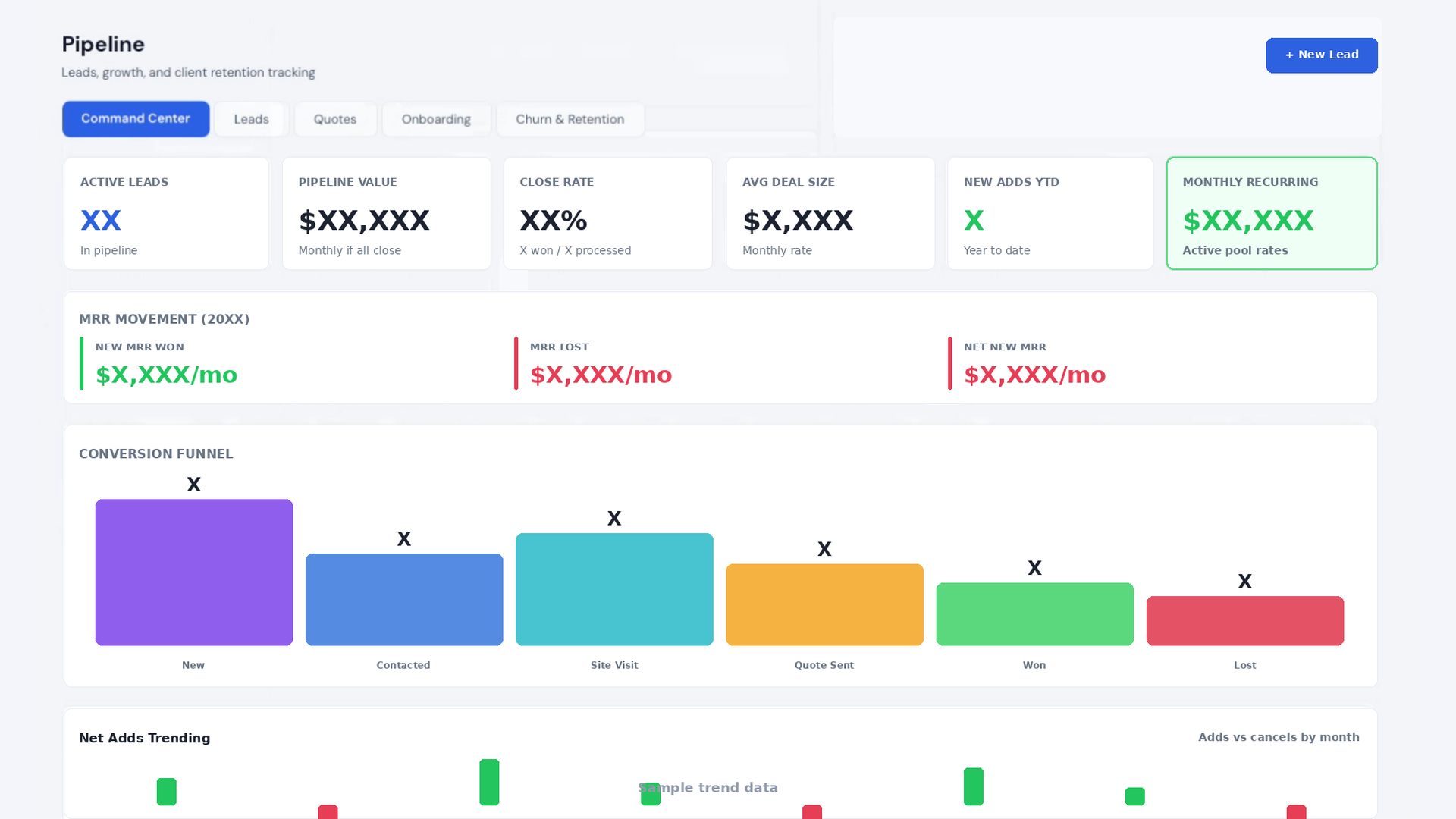
What he's produced includes a command center that pulls data from multiple sources, a pipeline view for tracking work in progress, and a customer screen that lets him initiate calls or texts from a single interface. The important framing: Dean isn't trying to replace his core software. He's building small, purpose-specific tools on top of a stable platform to handle the parts of his workflow that are specific to his operation.
Finding patterns in billing and supply data
Ben Nabors downloads invoices from his distributors, combines them with work orders from Skimmer, and runs the combined data through an AI tool to find discrepancies — supplier pricing variances, billing gaps, items charged but not logged. Work that would take hours manually gets done in a fraction of the time.
His output wasn't perfectly accurate. Some discrepancies the AI flagged didn't hold up on closer review. But it got him to 80% and surfaced exactly which areas needed a second look, which is still a significant time savings compared to doing it manually.
A note on vibe coding: what it can and can't do
Vibe coding — using AI to build software tools without formal development experience — is worth understanding because it's increasingly accessible and increasingly misunderstood.
It works for: internal tools with few users, simple forms, prototypes, and one-off tasks you'd otherwise skip entirely. A lead capture form on your website, a basic internal dashboard, a quick calculator — these are reasonable applications.
It breaks down on: anything involving customer data or payments, anything that needs to be reliable under pressure, and anything you can't debug yourself when it fails. Apps built through vibe coding break more often than purpose-built software, lack proper security protocols, and don't scale reliably.
The practical question to ask before building anything: what happens when this breaks during your busy season? If the answer is "I'm in serious trouble," that tool should be built on something proven and supported — not vibe coded.
The right mental model: Vibe coding is useful for small custom tools that sit on top of something stable. It's not an appropriate foundation for the systems your business depends on.
What Skimmer is building
Skimmer's approach to AI is built around three principles: it should be purpose-built for the pool industry, not generic; it should live inside the platform you're already using, not require a separate tool to manage; and it should be practical and accurate enough to actually use, not impressive in a demo and unreliable in practice.
There are currently two features in various stages of availability with more on the horizon.
AI phone is available now, with a 30-day free trial. It handles inbound calls when you're unavailable — out on a route, after hours, or simply unable to get to the phone. It's trained on pool industry data and handles realistic service scenarios: new customer inquiries, repair requests, billing questions, and the kind of unusual situations that come with the territory.
When an unknown caller contacts you, AI Phone creates a new lead record in Skimmer automatically, with a log of the call and relevant context attached. Existing customers are recognized by their phone number. You can set transfer rules so specific call types route to the right person on your team — billing questions to one person, equipment emergencies to another.
Setup involves forwarding your existing number to the Skimmer-provided AI Phone number, so your actual number doesn't change. Some phone systems require a few specific configuration steps (iPhones and Google Voice both have particular settings to adjust), and Skimmer's support team has documentation for the most common setups.
AI insights is currently in beta. The goal is to let you ask natural-language questions directly to your Skimmer data, without downloading reports or building spreadsheets. Questions like "which customers haven't been assigned to a route," "who owes me money," or "how much time are my techs spending on site" become direct queries. Future development includes chemical usage monitoring — flagging techs who are consistently using more product than expected, which can indicate inventory loss or dosing errors. Skimmer is actively looking for beta testers.
Your four-step starting plan
None of this requires a technical background or a big investment of time. Here's a simple plan that works regardless of where you're starting from.
Step 1: Start using the tools. Pick one platform (Claude, ChatGPT, or Gemini) and use it this week for something real. Not a test, not a demo. A task you actually need done: a customer email, a response to a review, a social post you've been putting off. Get a feel for how it works before optimizing anything.
Step 2: Identify two or three specific tasks where AI could help. Make these specific tasks, not vague goals. A newsletter you've been meaning to send, a set of template responses for your most common customer situations or a review of your supplier invoices against your work orders. Pick things with a clear output so you can tell whether the AI is actually saving you time.
Step 3: Get a paid subscription. Free versions are adequate for exploration. For consistent business use, the paid tiers — around $20/month — produce better output and give you more privacy controls. You can cancel anytime. The investment is worth testing seriously.
Step 4: Finish what you start. AI projects are easy to begin and easy to abandon. Set a clear goal for each task, review the output, and complete the loop before moving to the next thing. The pool pros seeing the most value from AI aren't the ones with the most ambitious plans, they're the ones who pick small tasks and actually finish them.
.jpg)


